


Guides · Start here
How to play Riventale
Open riventale.world, press Your Realm, then New world, and choose a path. A new world drops you in the calm middle lands with empty hands. A full day lasts ten minutes, and a little under half of it is night: the pause menu shows how many minutes are left until night or dawn.
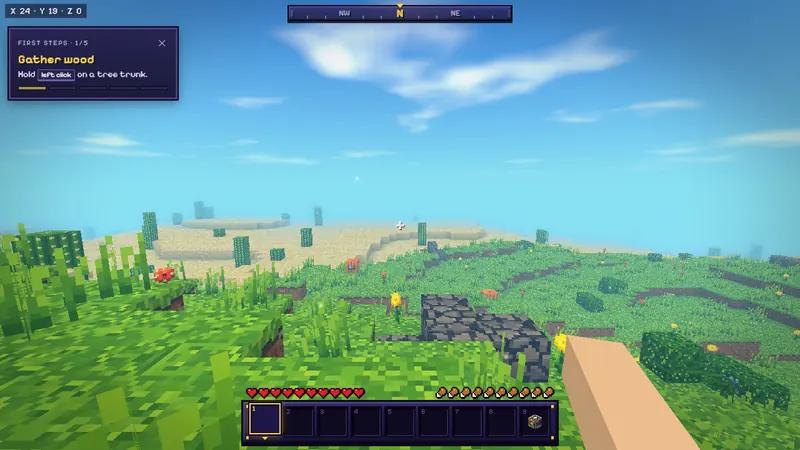
Start a world
Pick how hard the world fights back. You can make other worlds later on other paths: your realm holds five.
| Path | Hunger | Monsters | Starving |
|---|---|---|---|
| Easy: the Wanderer | None. Food heals you directly. | Half damage, and fewer of them | Never happens |
| Medium: the Adventurer | A hunger bar. You heal while it is nine-tenths full or more. | Normal damage | Stops at half a heart |
| Hard: the Champion | A hunger bar, as on Medium | One and a half times the damage, more of them, bosses act more often | Can kill you |
Under the paths is an I'm new button. Turn it on and Rivet, a small scout robot, walks you through the basics in your new world. New single-player worlds open with a short story scene; you can watch it again from the Journal's Story tab. On a computer, click the game to start moving.
Choose your calling
A new character picks a calling when it first steps into a world. A calling gives a small first kit and a free outfit, and nothing else: every calling can learn spells, draw a bow and use any blade. A character from before callings arrived is asked once, the first time it comes back. Decide later leaves the choice in the Journal.
| Calling | First kit | Outfit (free) |
|---|---|---|
| Warden | Stone Sword, Wooden Helmet, Wooden Chestplate, 4 Bread | Warden Tabard: an iron-grey tabard over mail with the gold Crystal crest, leather pauldrons, a crimson half-cape |
| Wayfarer | Recurve Bow, 16 Arrows, 4 Bread | Wayfarer Cloak: a green hood and travelling cloak, a leather jerkin, archer’s bracers, the quiver on the back |
| Arcanist | A Dawnstone Focus and a first spell (Rimeshard or Cinderbolt), 4 Bread | Arcanist Robe: a deep violet robe with silver runes at the hem, a short mantle, a pale glow at the hands |
| Shade | Stone Dagger, 3 Cookies, 4 Bread | Shade Wrap: a charcoal wrap crossed with straps, a hood and half-mask, a red scarf |
The kit comes once per character. Change your calling any time in the Journal's Calling tab: the new calling's outfit joins your Looks and you keep the old one, but there is no second kit. Kit items that don't fit in your bag wait in the Calling tab until you collect them.
Your first day
Until you have done them, the top left corner lists five steps. They are the shortest path to a working pickaxe:
- Gather wood. Hold left click on a tree trunk (on a touch screen, press and hold). Oak, birch, pine and jungle logs all work the same.
- Make boards. Press E and put a log in the 2×2 crafting grid: one log gives four Oak Boards.
- Build a Maker's Bench. Four boards in the 2×2 grid. Place it on the ground and right click it to open the 3×3 grid.
- Craft a pickaxe. First make hafts (two boards, one above the other, give four). Then three boards across the top row and two hafts down the middle column.
- Mine some stone. Dig down to grey stone. It drops Fieldstone, the first building stone and the material for stone tools.


Tools never wear out in Riventale, so one pickaxe lasts until you replace it with a better one. Make a stone pickaxe, axe and sword as soon as you have Fieldstone: stone is the tier that can mine iron ore.
What to gather on day one
 Logs, plenty of them. Twenty logs is a good first haul: boards for the bench, hafts, a chest and a first shelter.
 Fieldstone. A few stacks. Eight of it makes a Forge.
 Coal. Black-speckled stone near the surface and down to deep caves. A wooden pickaxe can mine it. One coal and one haft make four torches.
 Food. Pigs and cows drop raw meat, chickens drop raw chicken and feathers. Hedgeberry bushes grow in forests and pine woods; wild carrots and potatoes grow on the plains; pumpkins and melons sit in the grass.
 Sand. Smelted in a Forge it becomes glass, for windows and later for moonstone orbs.
Raw meat is edible, but roasted it restores almost three times as much. Roast Pork and Roast Beef are the best common foods; Bread (three wheat in a row) is next.
The first night
At night, monsters appear on the surface, on top of whatever block is highest. In caves they appear at any hour. They never appear inside a closed room: four walls and a roof keep you safe, whatever the light. Riventale has no doors, so close the way in with a block and dig it out in the morning.
- Fastest shelter: dig three blocks into a hillside, step in and put a block back behind you.
- First house: a 5×5 room of boards or Fieldstone, two blocks high, with a roof. Put your bench, a chest and a Forge inside.
- Torches light the room so you can see what you are doing. They do not stop monsters from appearing; a roof does.
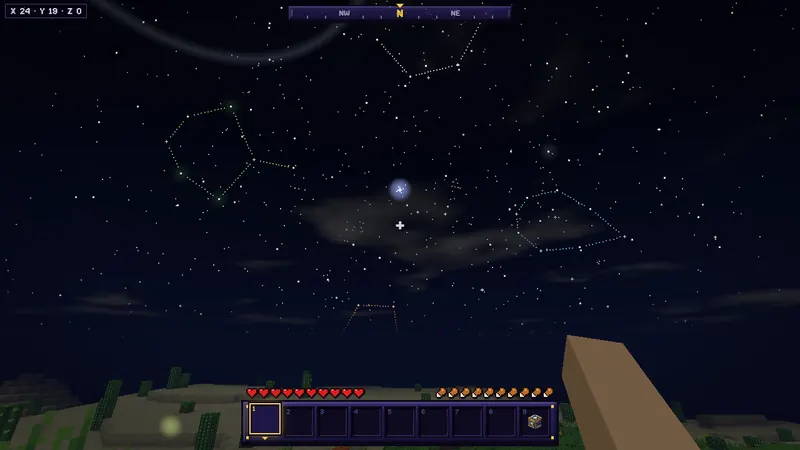
The night monsters of the middle lands are the Hollow (walks at you and hits), the Bonewalker (keeps its distance and shoots arrows) and the Crawler (fast, low and climbs walls). Hollows and Bonewalkers catch fire in daylight under the open sky. In the desert most of what comes out is the Dust Hollow, which does not burn and whose hits make you hungry; in snowy lands it is the Frostbitten, whose hits chill you. Deep caves below Y −20 also hold Gloops, which split into Glooplings when hit.
Hit a monster while falling from a jump for a critical hit. If you would rather not fight, stay in: the night passes in under five minutes.
The Forge
Eight Fieldstone in a ring at the Maker's Bench make a Forge. Right click it: ore goes on top, fuel below, and the result comes out on the right. Each item takes five seconds. A piece of coal burns for forty seconds, enough for eight items; a log or a board burns for one and a half items. No coal yet? Smelt a log into charcoal: it burns as long as coal and makes torches too.


Iron ore becomes iron ingots, and iron gives the next tools, armour, a compass, lanterns and track. The crafting guide has the full smelting and fuel tables.
Dying and getting your things back
When you die, everything you carried drops where you fell and stays there for ten minutes. A skull on the compass strip at the top of the screen shows the direction, the distance and the time left, and a gold column of light rises from the spot. Respawn, follow the skull and pick it all up. Later, a moonstone orb can carry you straight to where you last died.
Saving
Single-player worlds save in your browser on their own every few seconds; a small Saved mark flashes at the top right. The pause menu says when the world was last saved; Leave world returns to the title screen, and Continue brings you back. In Your Realm you can rename a world, download it as a file to keep a copy, and load a world file back into a free slot. Clearing your browser's site data deletes saved worlds, so download a copy of a world you care about.
Controls
Every key can be changed in Settings > Controls > Keys, with two keys per action. Settings open from the title screen (top right) and from the pause menu, and your browser remembers them.
Keyboard and mouse
Click the game to capture the mouse; Esc lets it go and opens the pause menu.
| Key | Action |
|---|---|
| W A S D or arrow keys | Move |
| Mouse | Look around |
| Space | Jump, swim up; in the air with a jetpack, fly; falling with wings, glide |
| R or Ctrl | Run |
| Shift | Sneak: you will not fall off edges; also gets you out of a boat or rail cart |
| Left click (hold) | Mine a block, attack |
| Right click | Place a block, use, eat, read a page, revive a friend (hold) |
| Right click (hold, then let go) | With a bow: draw and shoot. With a crossbow: hold to load, click to shoot |
| Right click (with a Dawnstone Focus) | Cast the spell it holds; hold to keep casting. See magic |
| Middle click | Pick block: select the block you are looking at from your hotbar or bag |
| 1 to 9, scroll wheel | Choose a hotbar slot |
| E or Tab | Inventory and crafting |
| Q | Drop one item; Ctrl+Q drops the stack |
| V or F5 | Change camera view |
| T or Enter | Chat; / opens chat with a command |
| J | Journal: achievements, Torn Pages, the story, your numbers in this world |
| F | Friends |
| G | Robot squad orders |
| H | Set a home |
| . | Throw a fireball while wearing the Fire Chestplate |
| C | With a Dawnstone Focus: the next ready spell |
| B | Spell book: choose your three ready spells |
| Y / N | Accept or refuse a teleport request |
| F3 | Debug information |
| Esc | Pause menu: settings, invite, leave the world |
Inventory shortcuts
- Click picks up or puts down a stack; right click takes half, or puts down one.
- Shift+click moves a stack between bag and hotbar, into or out of a chest, ore and fuel into a Forge, armour onto your body.
- Double click a stack to gather every matching item into your hand.
- Drag a held stack across slots: left button splits it evenly, right button puts one in each.
- Press a number key over a slot to swap it with that hotbar slot.
- Sort buttons tidy the bag (the hotbar stays as it is) and an open chest.
Chat commands
Type /help in chat for the list. The everyday ones: /sethome 1 to /sethome 4 and /tphome 1 to /tphome 4 for four homes, /spawn, /players, /trust and /untrust (who may build on your claimed land), /claims, /tpaccept, /tpdeny, /robots with an order, and /team with a colour. In chat, the up and down arrows bring back earlier messages and Tab completes commands and player names.
Touch: phones and tablets
Turn your phone sideways: Riventale plays in landscape.
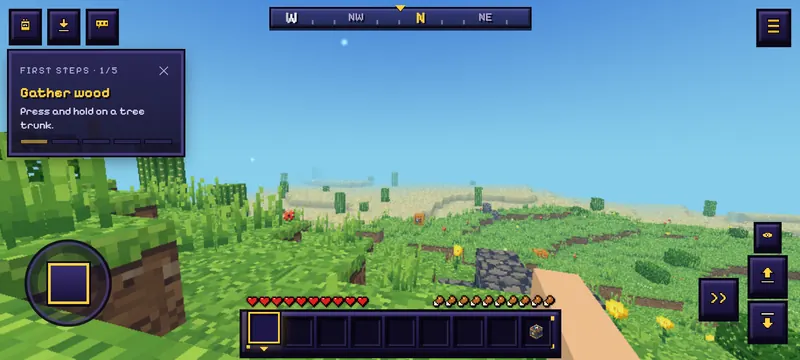
- Move: the joystick at the bottom left. Push it all the way to run.
- Or the D-pad: Settings > Controls > Move with: D-pad. Press between two arrows to walk diagonally, and slide your thumb from one arrow to another to turn without lifting it.
- Look: drag anywhere else on the screen.
- Use or place: tap. Mine or attack: press and hold.
- Jump, Run, Sneak, camera view: the buttons at the bottom right. Run and Sneak are switches: tap once to turn on, again to turn off.
- Bow and crossbow: with one in hand, a Draw button shows above the camera button. Hold to draw, slide the same thumb to aim, lift to shoot. See weapons.
- Dawnstone Focus: in its place, a Cast button. Tap to cast, or hold, aim and lift; its corner switches spell. See magic.
- Inventory, drop, chat: the small buttons at the top left; squad and fireball buttons appear when you need them. ☰ at the top right opens the menu.
- Arrange controls: in a world, pause, open Settings > Controls and drag the buttons where you want them. Portrait and landscape keep their own places.
Settings, tab by tab
| Tab | What it holds |
|---|---|
| Video | Graphics (Low: plain sky and still water; Medium: swaying plants, shiny water, torch glow; High: clouds, stars, colour grading and bloom), render scale 50-100%, view distance 2-10 chunks, field of view 60-110°, view bob, damage numbers, boss cinematics |
| Controls | Mouse sensitivity, touch look speed, Move with (joystick or D-pad), invert look, auto-jump, toggle run, toggle sneak, and Keys for remapping |
| Sound | Master, Music, Effects and Ambience volumes, and Mute |
| Comfort | Coordinates, the compass strip, danger hints, right-click tips, reduced motion, colour-blind safe colours, touch button size, subtitle size |
If the game runs slowly
- Lower View distance first: it has the biggest effect.
- Set Graphics to Medium or Low.
- Lower Render scale to 75% or less: the world is drawn smaller and enlarged.
- Close other tabs. Riventale needs WebGL, which Chrome, Edge, Firefox and Safari all have.
Where to go next
- Find iron and dig deeper for gold and Dawnstone: the depths are in Biomes and lands.
- Learn the recipes that matter: Crafting. Arm yourself: Weapons.
- Open old chests in cabins, desert temples, igloos and dungeons: the first one you open always holds Torn Page I. Read on in the story.
- Press J for the Journal: achievements, the pages you have found and your numbers in this world.
Next: Crafting. All sections: the guides.